Introducing Greenlight Bills: A Better Way to Get Vendor Bills Into NetSuite
Vendor bill entry is one of those processes that seems simple until you spend enough time around accounts payable.
An invoice arrives by email. Someone opens it, finds the vendor, keys in the header information, figures out whether there is a purchase order, matches the lines, checks quantities and amounts, fills in coding, attaches the document, and saves the bill.
None of those steps are especially complicated by themselves. The problem is that AP teams have to repeat them hundreds or thousands of times, while also dealing with invoices that do not look alike, vendors that use their own terminology, partial PO billing, shipping and tax, missing information, and documents that should never have entered the process in the first place.
We have spent years working in NetSuite environments and have seen that process handled in just about every way possible.
Some companies key everything manually. Some build scripts around email inboxes. Some use external AP platforms. Some use NetSuite Bill Capture. Most end up with a combination of tools, manual review, and institutional knowledge that works reasonably well until volume increases or the person who understands the process is out of the office.
Greenlight Bills grew out of that experience.
We did not want to automate the wrong part
There are plenty of invoice automation products that promise touchless processing.
That was not the goal we started with.
Vendor bills are accounting transactions. They affect expenses, liabilities, inventory, purchase orders, tax, departments, locations, classes, projects, and eventually cash. When something is wrong, the important question is not whether the system processed the invoice quickly. It is whether someone caught the problem before the transaction became part of the books.
So Greenlight Bills is built around a simpler idea: automate the repetitive work, then give an AP user a good review experience before anything is committed.
A bill can arrive by email or be uploaded directly. Greenlight reads the source document, identifies the vendor, extracts the invoice information, looks for the relevant purchase order, and prepares the bill for review.
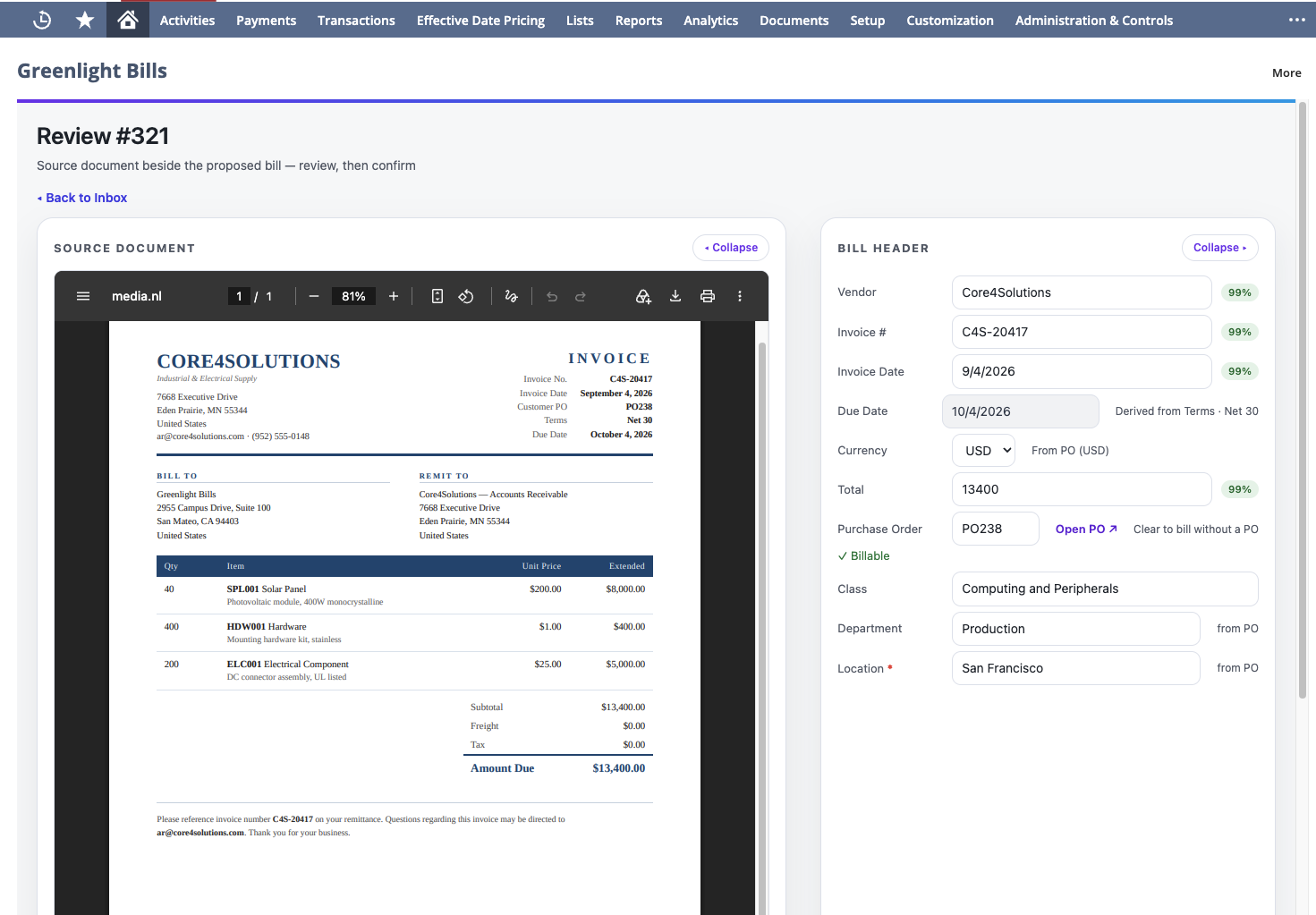
The AP user still confirms it.
That review step is intentional.
We would rather save most of the manual work and keep a human in control than design around an automation percentage that looks good in a sales deck.
The source document and the NetSuite transaction belong together
One of the frustrations with invoice processing systems is that the work often happens somewhere other than NetSuite.
An AP user logs into a separate portal, reviews an invoice there, resolves an exception there, and eventually sends a transaction back to NetSuite.
Sometimes that is exactly what a company needs, especially when the AP platform is handling payments, supplier onboarding, purchasing, cards, and other parts of the process.
Greenlight Bills is narrower by design.
NetSuite remains the system of record. The review experience is built around the NetSuite transaction, and the source invoice stays connected to the bill that was created from it.
We do use an external extraction service to read submitted documents. The extracted information is returned to NetSuite, where the user reviews and confirms the transaction.
That distinction matters to us. Greenlight Bills is not intended to become another finance system that your accounting team has to manage alongside NetSuite.
Purchase orders are where invoice capture gets harder
Extracting an invoice number, date, and total is useful, but it is not the part of bill entry that usually requires the most judgment.
Purchase order invoices are where things become more interesting.
A vendor might bill only part of an open PO. A blanket PO may be billed across several invoices. Quantities might have been received but not billed. A line description on the invoice may have very little resemblance to the description on the PO.
The AP user needs to understand what is actually billable and how the invoice relates to the remaining PO.
We built Greenlight Bills so the review starts from that accounting reality.
When a bill is associated with a PO, the user sees the relevant PO lines and the amounts that are actually available to bill. Partial billing is expected rather than treated as an edge case. The goal is to help the reviewer get to the right bill, not simply extract whatever text happened to appear on the invoice.
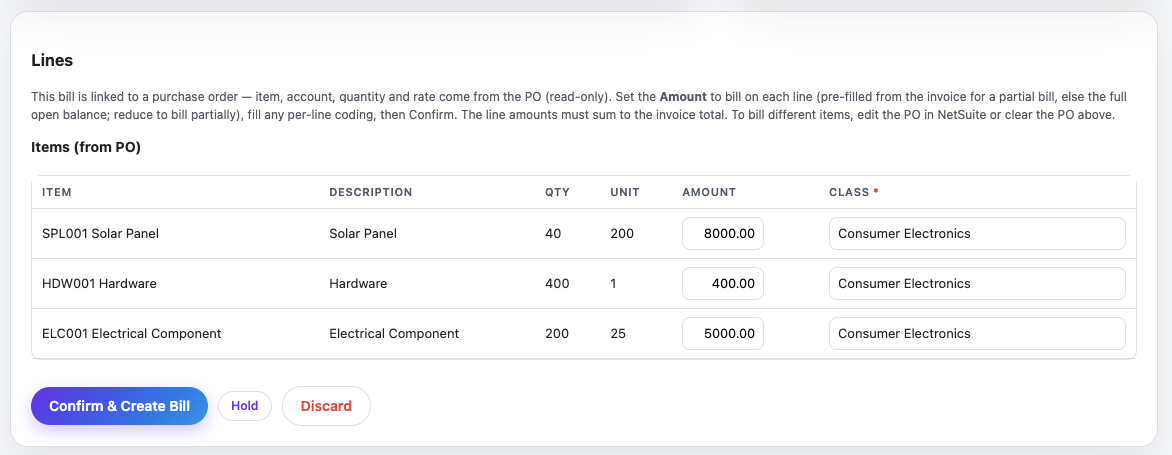
That is one of the areas where our own experience implementing invoice capture influenced the product most heavily.
We will write more about that separately because there is a lot to unpack.
Vendors are more consistent than invoices make them look
Invoice layouts vary, but individual vendors usually have patterns.
One vendor may always put the PO number in a particular field. Another may describe freight a certain way. A recurring service provider may consistently require the same department or account coding. A vendor may use language on its invoices that makes perfect sense to the AP team but means nothing to a generic extraction model.
Greenlight Bills can maintain vendor-specific profiles and coding memory so the system gets better context for the vendors a company actually works with.
We think this is more useful than pretending every invoice can be understood in isolation.
AP teams already build this kind of knowledge informally. They know that a particular vendor invoice needs to be handled a certain way because they have seen it fifty times.
The software should be able to learn some of that context too.
Not every attachment is a bill
Anyone who has worked with an AP inbox knows what happens when vendors start emailing documents.
Logos arrive as image attachments. Email signatures contain graphics. Statements get mixed in with invoices. Supporting documents show up next to the actual bill. Occasionally something arrives that has nothing to do with AP at all.
An invoice capture process that treats every attachment as an invoice creates cleanup work instead of removing it.
Greenlight Bills classifies incoming documents before they enter the review process. Things that clearly are not vendor bills can be discarded rather than creating another item for AP to investigate.
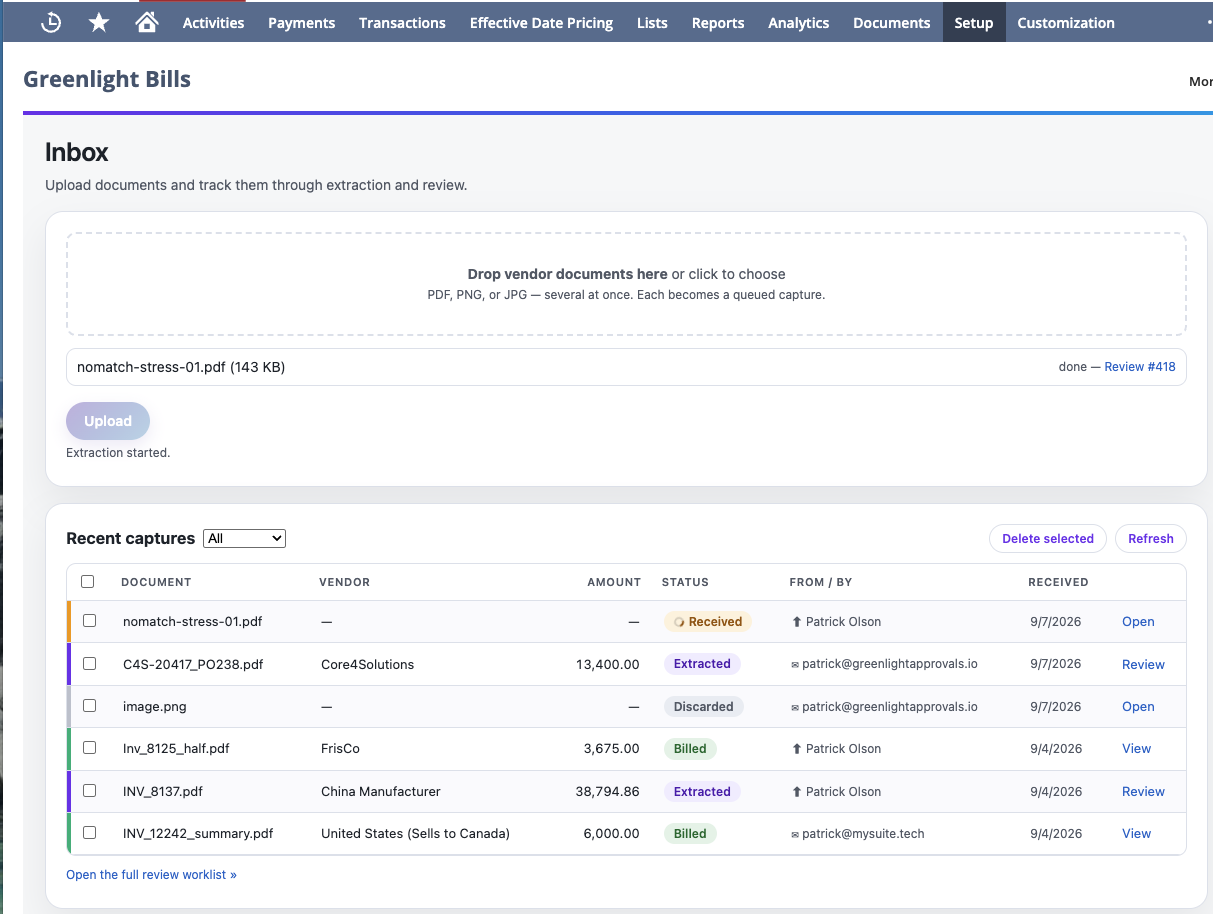
This sounds like a small feature. In practice, small sources of noise matter when they happen every day.
Why we built another NetSuite bill capture product
NetSuite already has Bill Capture, and there are several mature AP automation products in the market.
We are not arguing that every NetSuite customer needs another option.
For some companies, native Bill Capture will be enough. For others, an end-to-end AP platform that handles procurement, payments, supplier management, and spend controls will make more sense than a focused NetSuite tool.
Greenlight Bills is for a different situation.
It is for teams that want to improve how invoices get into NetSuite without replacing NetSuite as the center of the process.
It is also the product we wanted to have available when we were working through some of these problems ourselves.
We have implemented NetSuite Bill Capture, worked around limitations in real client environments, and seen where seemingly minor workflow decisions create ongoing AP work. Those experiences shaped Greenlight Bills much more than a generic list of invoice automation features did.
We are writing about those lessons, starting with a detailed comparison of NetSuite Bill Capture and Greenlight Bills: where native capture is a good fit, where it becomes harder to work with, and what companies outside the United States should know about the current options.
Greenlight Bills is available now
Greenlight Bills currently supports invoice intake by email and upload, AI-assisted extraction, vendor identification, PO matching and review, coding assistance, duplicate detection, and a suggest-and-confirm workflow inside NetSuite.
We are deliberately keeping the first version focused.
There are larger AP automation platforms with broader feature sets, and there are edge cases we are not trying to solve before customers actually ask us to solve them. Our priority is to make the core bill capture and review workflow work well for real NetSuite AP teams.
If your team is still keying vendor bills manually, is evaluating NetSuite Bill Capture, or has tried invoice capture and found that the review process creates as much work as it removes, we would be interested in seeing how your AP process works today.
See it on your own invoices. You can learn more about Greenlight Bills or schedule a walkthrough with us.