NetSuite Bill Capture vs Greenlight Bills: A Practical Comparison
If you are already using NetSuite and want to reduce manual vendor bill entry, NetSuite Bill Capture is an obvious product to consider.
It is Oracle’s own solution. Bills can come in through email or upload, invoice information is extracted, NetSuite records are used for matching, and an AP user can review the result before creating the Vendor Bill. Oracle has also continued to add functionality to Bill Capture, including improvements in recent NetSuite releases.
We have implemented Bill Capture twice for NetSuite clients. There are things it does well, and for some companies it may be all they need.
Greenlight Bills came from the parts of those implementations that did not work as well as we wanted them to.
The biggest problems were not whether AI could read an invoice number or find a total. They showed up around the edges of the process: who was allowed to send invoices, what vendors received in response, what happened when an invoice email contained other attachments, how recurring vendor quirks were handled, and how much flexibility we had during the actual bill review.
That experience shaped a lot of the decisions we made when building Greenlight Bills.
NetSuite Bill Capture is the obvious place to start
There is significant overlap between the two products.
Both can accept vendor invoices by email or upload. Both extract invoice data rather than requiring someone to enter the entire Vendor Bill manually. Both use information from NetSuite to identify vendors and purchase orders. Both have a review process, and both can learn from corrections made by AP users.
Bill Capture also supports vendor templates and partial PO billing. It is much more than basic OCR.
For a U.S. NetSuite customer with a straightforward AP process, stable vendor contacts, standard Vendor Bill fields, and relatively simple PO matching requirements, the native product can be a sensible choice.
We are not trying to make the case that every NetSuite customer using Bill Capture should replace it.
Where our opinion changed was after seeing what happened once invoice capture became part of the day-to-day AP process.
Where we started running into problems
Email intake was one of the first issues.
NetSuite’s Transaction Email Capture validates the person sending the invoice. The sender generally needs to be an active employee or have an email address registered on the appropriate vendor record.
That means AP is not simply giving vendors an inbox and asking them to send invoices there. Someone also needs to maintain the list of people who are allowed to use it.
In a clean example, this is manageable. Vendor A has an accounts receivable contact named Susan, Susan always sends the invoices, and her email address is registered on Vendor A.
Actual AP inboxes tend to get messier.
Susan leaves and someone else takes over. A vendor has three people who send invoices. An employee forwards an invoice they received directly. An outsourced accounting group submits invoices for multiple companies. A shared email address is used for more than one vendor.
NetSuite also restricts the same captured email address from simply being associated with multiple vendors. That can become awkward when a bookkeeping firm, shared service provider, or similar organization sends invoices on behalf of more than one supplier.
We did not want sender identity to determine vendor identity in Greenlight Bills.
By default, an invoice can be submitted without registering every person who might send it first. Greenlight reads the invoice and identifies the vendor from the document and the NetSuite context available to it.
Companies that want a more controlled inbox can still have one. Inbound email can be restricted to approved individual addresses or approved domains.
The domain option is useful because a company can trust mail from a particular organization without forcing every sender at that organization to be tied to one NetSuite vendor. The same approved domain can submit documents involving multiple vendors when that reflects the way the business actually operates.
Some companies will prefer strict individual sender control. Others will decide that the administrative overhead is not worth it. We wanted that to be an implementation choice.
Email attachments created another, smaller annoyance.
A vendor rarely sends a perfectly clean email containing one PDF and nothing else. There may be logos, signature graphics, statements, remittance documents, or other files attached or embedded in the message.
Oracle’s own Transaction Email Capture documentation notes that Bill Capture cannot distinguish a vendor bill attachment from an email signature image in every case.
Greenlight classifies attachments before treating them as invoices. A real invoice continues into extraction. A logo or signature image does not need to become another item for somebody in AP to clear from a queue.
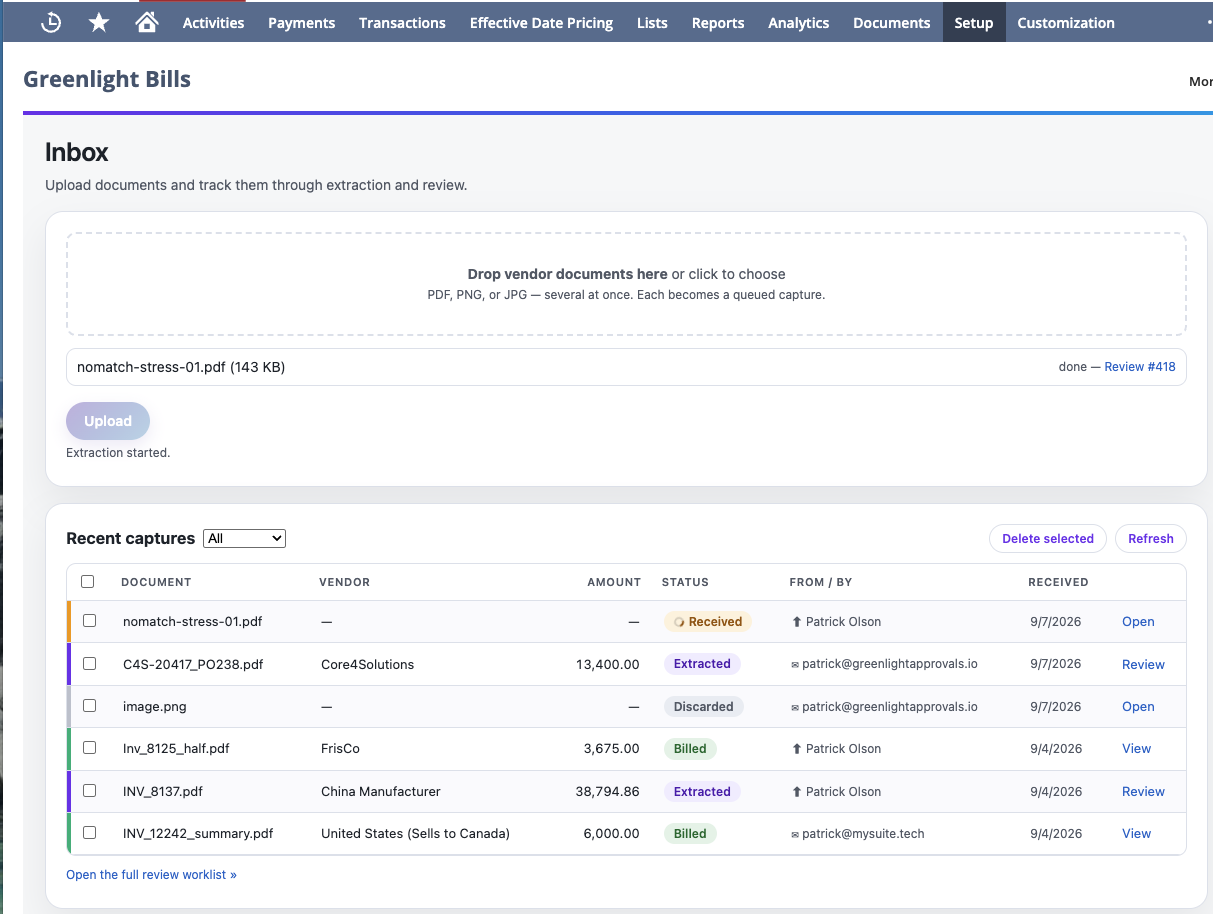
None of this sounds particularly dramatic. It becomes more noticeable when it happens repeatedly across hundreds of vendor emails.
Vendor communication became its own problem
This was probably the most frustrating issue in the Bill Capture implementations we worked on.
When vendors submit invoices through NetSuite’s email capture process, NetSuite sends processing notifications back to them. Error messages are also generated when submissions fail.
We found the standard responses difficult to control.
The messages were generic, and vendors sometimes received emails referring to NetSuite processing that meant very little to the person who had simply emailed an invoice to their customer.
More importantly, we could not find a supported configuration that let us simply turn the normal successful-processing response off or replace it with whatever message the client wanted to send.
We eventually built and published a workaround for this problem before Greenlight Bills existed.
There is also a NetSuite SuiteIdeas enhancement request for greater control over these vendor notifications that has been open since at least 2024.
When we built Greenlight Bills, we approached the problem differently.
Vendor acknowledgements are off by default.
An invoice can arrive, be processed, and appear for AP review without sending anything back to the vendor.
If a company does want acknowledgements, they can turn them on. The received and rejected messages use client-editable NetSuite email templates, so the business controls what its vendors are told and how the message is written.
Some companies will want a simple “we received your invoice” response. Others may want the message to contain invoice information or instructions for correcting a rejected submission. Some AP teams would rather send nothing at all.
All three are reasonable choices.
We did not think the software vendor should make that decision for them.
Templates versus learning how a vendor actually works
NetSuite Bill Capture has vendor templates, and its learning capabilities are useful.
Corrections made during review can influence future results. Templates can also save values for a vendor and subsidiary combination and apply those values to later invoices.
That works well for a lot of recurring behavior.
What we kept encountering, though, were vendor patterns that were not really static field defaults.
A vendor might call a purchase order an “Order Number.” Their invoice might show 1287, while the corresponding NetSuite transaction is PO-1287.
Another vendor might use its own item numbers instead of yours.
A recurring invoice might always need a particular department unless a specific phrase appears on the document. One issuing entity might belong to one NetSuite vendor while another company name on a nearly identical invoice belongs somewhere else.
These are the kinds of things an experienced AP clerk learns after processing the same supplier for a while.
Greenlight vendor profiles are designed to capture more of that context.
A profile can contain vendor identity hints, item mappings, coding memory, and plain-language rules explaining how information on that vendor’s invoices relates to NetSuite.
In the PO example, the profile can explain that the vendor’s Order Number corresponds to your PO number after adding the PO- prefix.
Greenlight still has to find that purchase order in NetSuite and confirm that it belongs to the right vendor. The instruction does not give the extraction process permission to invent a match.
Profiles can also vary when the same vendor behaves differently by subsidiary, currency, issuing entity, or document type.
We expect this part of the product to keep getting better as we see more real invoices. Vendor behavior is one of those areas where the exceptions become obvious only after people start using the system.
The review screen has to work with your NetSuite account
Invoice extraction gets most of the attention in bill capture products, but the review process is where AP users actually spend their time.
That review also has to reflect the NetSuite account they are working in.
Oracle documents limitations around customization of the Bill Capture review page, including restrictions involving custom fields.
That matters because many mature NetSuite accounts do not use a completely standard Vendor Bill.
A business may need a custom transaction body field completed before a bill can be posted. Another company may have custom information required on individual expense or item lines. Those fields are part of the accounting process whether an invoice capture product understands them or not.
Greenlight Bills has a configurable capture-field layer for client-specific transaction body and line fields. Those fields can participate in extraction, appear during review, be edited by the AP user, and flow onto the resulting Vendor Bill.
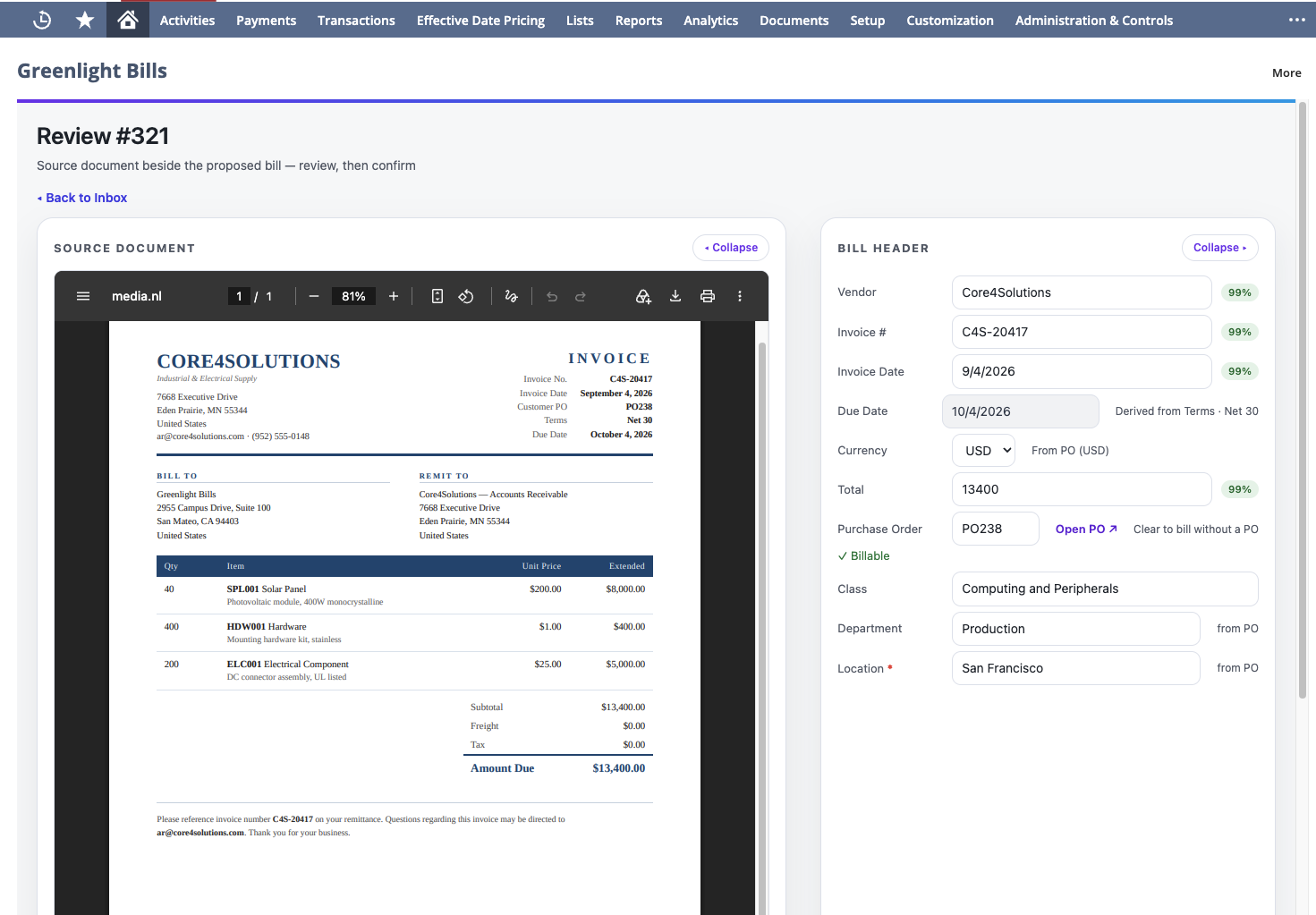
This becomes especially important once purchase orders are involved.
Both products support PO matching and partial billing. We do not claim that Greenlight invented either concept.
Our focus has been on making the review follow the actual state of the purchase order.
Once a PO is matched, Greenlight uses its billable lines to drive the review. The user can see what remains available to bill, what has been received, and what has already been billed. They can adjust the amount being billed on each line and leave the remaining balance open for a later invoice.
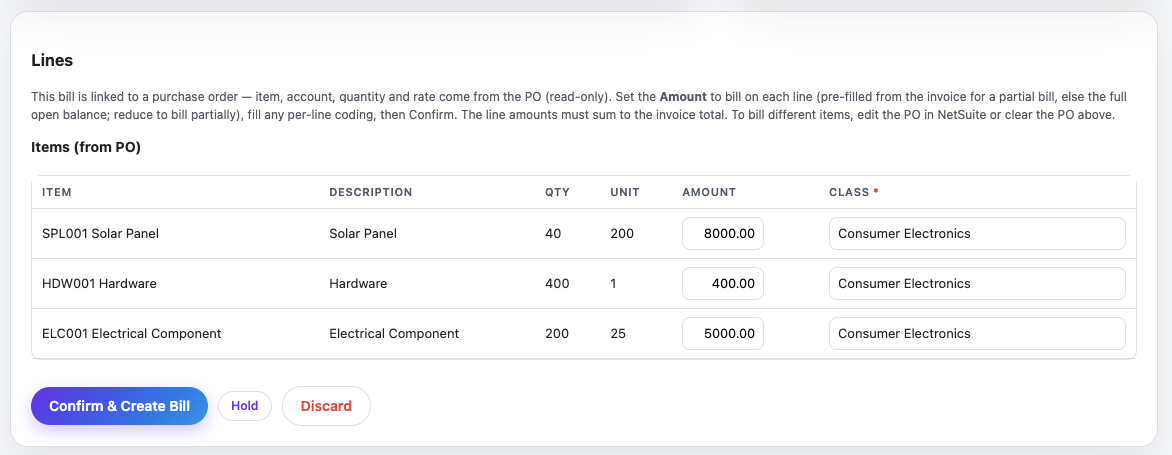
That is useful for partial invoices and blanket purchase orders, where “we found the PO number” is only the beginning of the problem.
The selected PO lines also need to reconcile to the invoice amount before Greenlight will allow the user to confirm the bill. When they do not, the difference is shown during review rather than buried in the resulting transaction.
There are still invoice scenarios we are working through.
Tax-inclusive PO billing and some off-PO or overbilling cases, for example, require more care than a clean partial PO invoice. We would rather surface those as exceptions than force them through a workflow that is not ready for them.
That is also why Greenlight currently uses a suggest-and-confirm model. The system does the repetitive work, but a person still confirms the Vendor Bill before it is created.
Outside the United States, there is another problem
Oracle currently documents NetSuite Bill Capture as available only in the United States.
Its current generative AI availability documentation also lists Bill Capture as U.S.-only and English-only, with additional account-hosting restrictions.
Greenlight Bills does not have a product restriction that limits it to U.S. subsidiaries.
That should not be confused with saying that every localization requirement in every country has already been solved.
Tax handling, subsidiary configuration, currencies, local accounting requirements, and the way a particular NetSuite account has been configured still need to be evaluated. We expect to learn more about some of those cases as customers use the product outside the United States.
The difference is that a NetSuite customer in Canada, the UK, Europe, Australia, or another market can evaluate Greenlight Bills without being excluded simply because of where the subsidiary is located.
So which one would we choose?
For some clients, we would still recommend looking at NetSuite Bill Capture first.
If the company is in the U.S., invoices are relatively predictable, vendor sender maintenance is not a concern, the standard review experience contains what the AP team needs, and the built-in email behavior is acceptable, there may be no compelling reason to introduce another product.
There is also a legitimate advantage to using Oracle’s own functionality. Some companies simply prefer keeping as much of their stack as possible with NetSuite.
Greenlight keeps its review screen and every NetSuite write inside your account, but document extraction itself runs through an external service. That is a tradeoff worth weighing.
Bill Capture can also automatically create certain qualifying PO bills without a reviewer. Greenlight intentionally does not do that today. If the main objective is maximum touchless processing and the company’s invoices fit that workflow reliably, NetSuite’s approach may be preferable.
Greenlight starts to make more sense when the limitations surrounding capture are creating as much work as the original data entry.
That might mean maintaining long lists of approved vendor senders. It might mean vendors receiving messages you do not want them to receive. It could be custom fields that are part of your real Vendor Bill process, recurring quirks from particular suppliers, more involved PO review, or simply operating NetSuite outside the United States.
There is another group of companies for whom neither product is enough.
If the real project is supplier onboarding, procurement, payments, cards, spend management, global payment rails, or a full AP operating platform, there are broader systems built for that job.
Greenlight Bills is intentionally narrower.
We are interested in the NetSuite customer who has enough invoice volume that manual entry has become expensive and annoying, but who does not want to move AP into another large system just to solve bill capture.
Why we built Greenlight Bills
The first time we implemented NetSuite Bill Capture, we learned a lot about what worked and what did not.
The second time, some of the same issues showed up again.
We initially worked around several of them because that was what the project required. Eventually it became clear that we had a fairly specific opinion about how this workflow should work.
NetSuite should remain the accounting system.
Vendors should be able to send invoices without creating unnecessary administrative work for AP.
The company should decide how, or whether, those vendors are contacted.
The system should learn the odd things that are true about individual suppliers.
The review should reflect the Vendor Bill the customer actually uses, including the fields and PO information their process depends on.
And when the software is not confident that a bill is right, a person should see the exception before the accounting transaction is created.
That is what we are building Greenlight Bills around.
Oracle will continue improving Bill Capture. We expect Greenlight Bills to change too as more AP teams use it and expose cases we have not seen yet.
If NetSuite Bill Capture already fits your process, keep using it.
If you are fighting some of the same issues that led us to build Greenlight Bills, we would be happy to show you how we approached them.
Fighting some of these same issues? Learn more about Greenlight Bills or book a walkthrough.